
Ever feel like you’re drowning in a sea of to-do lists, endless notifications, and the constant pressure to “do more”? In 2026, the struggle is real. We’re bombarded with options, and ironically, the tools 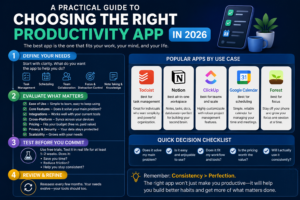 to help us often become another source of stress. I’ve been there. I’ve jumped from app to app, chasing the elusive promise of effortless productivity. The truth is, there’s no magic bullet. But choosing the right productivity app *can* make a world of difference.
Why Choosing the Right App Matters
Think about it: how much time do you spend *just managing* your tasks, calendar, and projects? A poorly chosen app can waste hours, create more chaos, and leave you feeling even *less* in control. On the flip side, a well-suited tool can streamline your workflow, free up mental space, and help you focus on what truly matters. This isn’t just about getting more done; it’s about reclaiming your time and energy. It’s about finding a system that works *for* you, not against you.
Understanding How Productivity Apps Work
Let’s get the basics down. Productivity apps come in many flavors. There are to-do list apps, calendar apps, note-taking apps, project management apps, and time tracking apps. Some are designed for individuals, others for teams. Some focus on task management, others on time optimization, and still others aim to be all-in-one solutions.
The core function is usually to help you:
- Organize information: Capture tasks, notes, ideas, and deadlines.
- Prioritize tasks: Determine what’s most important and when it needs to be done.
- Schedule your time: Block out time for specific tasks and appointments.
- Track progress: Monitor your activity and see what you’ve accomplished.
- Collaborate with others: Share tasks, deadlines, and files with team members.
The best apps offer features like reminders, integrations with other tools, and customizable views. But the “best” app is subjective; it depends on your needs, work style, and preferences.
Who are Productivity Apps For?
The beauty of productivity apps is their broad appeal. Whether you’re a student, a freelancer, a busy professional, or a team leader, there’s a tool out there that can help.
- Students: Need to manage assignments, deadlines, and study schedules.
- Freelancers: Track time, manage projects, and invoice clients.
- Professionals: Organize schedules, manage projects, and collaborate with teams.
- Team leaders: Assign tasks, monitor progress, and facilitate communication.
If you’re looking for an app that allows you to create shared task lists, assign responsibilities, and share files, then The Negotiation Game: How to Win Deals and Build Relationships in 2026 might also be a valuable tool to enhance productivity within your team.
Common Mistakes to Avoid
Choosing the wrong productivity app is easy. Here are some common pitfalls:
- Falling for the “more features = better” trap: A complex app with a million features can be overwhelming. Focus on what you *actually* need.
- Ignoring your work style: If you’re a visual person, a list-based app might not be the best fit. If you prefer to have all your data stored in one central hub, then you should consider a note-taking app like Notion.
- Failing to integrate it into your workflow: A great app is useless if you don’t use it consistently. Make sure it fits seamlessly into your daily routine.
- Not setting realistic expectations: No app will magically make you productive overnight. It takes time and effort to build new habits.
- Chasing the “perfect” app: There’s no such thing. Be willing to experiment and adapt.
Myths and Realities
Let’s bust some common myths:
- Myth: Free apps are useless.
Reality: Many excellent free apps offer robust functionality. They might lack some premium features, but they can be more than enough to get you started.
- Myth: More tools equal better results.
Reality: The more tools you use, the more time you’ll spend switching between them. The key is to find a few key tools and master them.
- Myth: Productivity apps make you inherently productive.
Reality: Apps are tools, not solutions. They support your productivity system, not create it.
Realistic Outcomes and Time Expectations
Don’t expect overnight miracles. Here’s a realistic timeline:
- Week 1: Research and choose 1-3 apps that seem promising.
- Week 2-3: Experiment with the apps. Set up your tasks, calendar, and projects.
- Week 4: Integrate the app into your daily routine. Start tracking your time and progress.
- Month 2-3: Refine your workflow. Adjust settings and features based on what’s working and what’s not.
- Ongoing: Continuously evaluate and adapt. Your needs and preferences will evolve.
Be patient with yourself. It takes time to build new habits.
Modern Relevance (2026 Environment)
In 2026, we’re dealing with unprecedented levels of information overload and digital distractions. AI is rapidly changing the landscape. Here’s how to stay ahead:
- Embrace AI: Some apps now offer AI-powered features like task prioritization and smart scheduling. Consider tools such as Lindy, which is an AI assistant, or Notion, which is considered an AI project management tool.
- Prioritize Focus: The ability to focus is more valuable than ever. Look for apps with focus modes, Pomodoro timers, and distraction-blocking features.
- Integrate Your Tools: Seamless integrations are crucial. Choose apps that connect with the other tools you use (email, calendar, communication platforms).
- Embrace Flexibility: Be open to change. The best app is the one that adapts to your evolving needs.
Future-Proof Considerations
To ensure your chosen app stays relevant:
- Look for cross-platform support: Choose apps that work on multiple devices (desktop, mobile, web).
- Consider the developer’s track record: Is the company actively updating and improving the app?
- Prioritize data security: Make sure the app has robust security features to protect your information.
- Be ready to adapt: The productivity landscape is constantly evolving. Be open to learning new tools and techniques.
Productivity Apps To Consider in 2026
Here are some popular productivity apps to consider in 2026. Keep in mind that the “best” app for you will depend on your individual needs:
- All-in-One: Pocket Informant is one of the best all-in-one productivity apps that includes tasks, calendar, notes, and projects in one tool.
- Task Management: Todoist is a great app for organizing your to-do lists and has a user-friendly interface.
- Calendar: Google Calendar is useful for scheduling.
- Project Management: For custom workflows, monday.com is the best choice.
- Time Tracking: Toggl Track is one of the best time-tracking tools that offers a generous free plan.
- Note-Taking: Notion is a popular choice for note-taking.
Remember, the goal isn’t just to *use* an app; it’s to build a *system* that helps you achieve your goals.
FAQs
Here are some frequently asked questions about productivity apps:
- What is the best productivity app?
The “best” app depends on your individual needs. Consider what you want to achieve and then explore different options to find the one that fits your workflow.
- Are free productivity apps any good?
Yes! Many excellent free apps offer robust functionality. They’re a great way to get started without spending money.
- How do I choose the right productivity app?
Identify your goals, assess your work style, research different apps, and try them out before committing.
- How long does it take to get used to a new productivity app?
It takes time to build new habits, so be patient. It might take several weeks to integrate a new app fully into your workflow.
- Should I use multiple productivity apps?
It’s generally better to focus on a few key tools and master them rather than spreading yourself too thin.
- What are the key features of a good productivity app?
Intuitive use, customizable views, and multiple views are some of the key features of a good productivity app.
- What are the benefits of using productivity apps?
Productivity apps can help you with time management, task prioritization, reducing distractions, and improving communication.
- How can I stay motivated to use a productivity app?
Set clear goals, integrate the app into your daily routine, and track your progress. Celebrate your accomplishments along the way.
Choosing a productivity app is a journey, not a destination. It’s about finding the right tools and building a system that helps you work smarter, not harder. Experiment, adapt, and don’t be afraid to change course if something isn’t working.
Remember, true productivity isn’t just about getting things done; it’s about doing the *right* things and making the most of your time. Start with purpose, find your method, and then choose the apps that support your success. With the right approach, you can unlock your potential and achieve more than you ever thought possible. You can explore Growfunda to find more resources.